You don’t know how much time is spent on the job site
You struggle to get accurate, timely job costs across active projects
Complex pay rules require manual audits and add risk
Payroll is a scramble, with HR chasing approvals and fixing errors
You find out a job went over budget when it’s too late to fix it
“Fieldclix helps increase the time our employees spend at remote job sites, so we can get more work done with our existing team.”
Darrin WagnerCEO, Test Communications
Accurate, automated timecards
Track the hours other systems can’t see
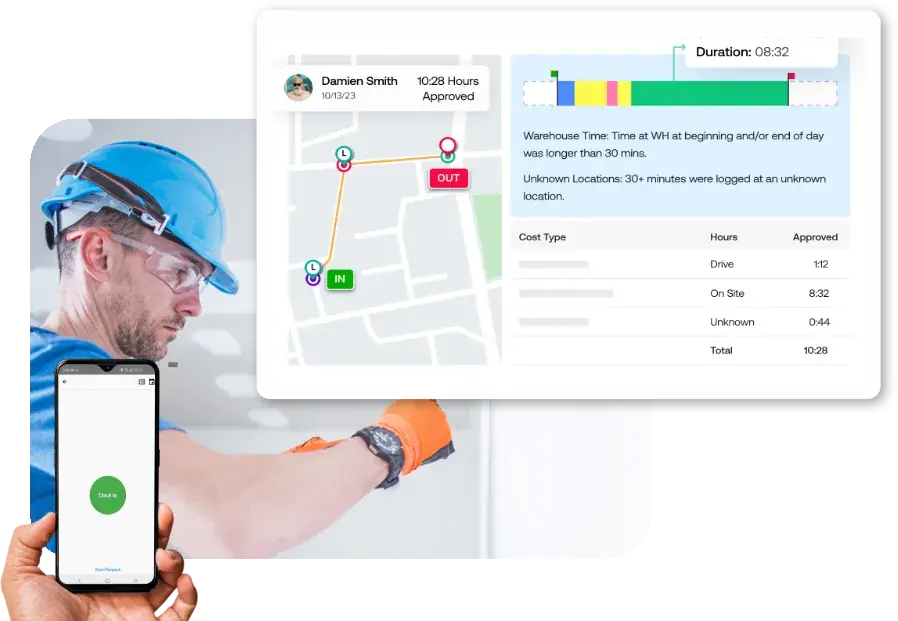
It couldn’t be easier. Crews clock in and out. Fieldclix uses GPS and geofences to allocate every hour to the right activity and job code, for clean, easy-to-approve timecards.
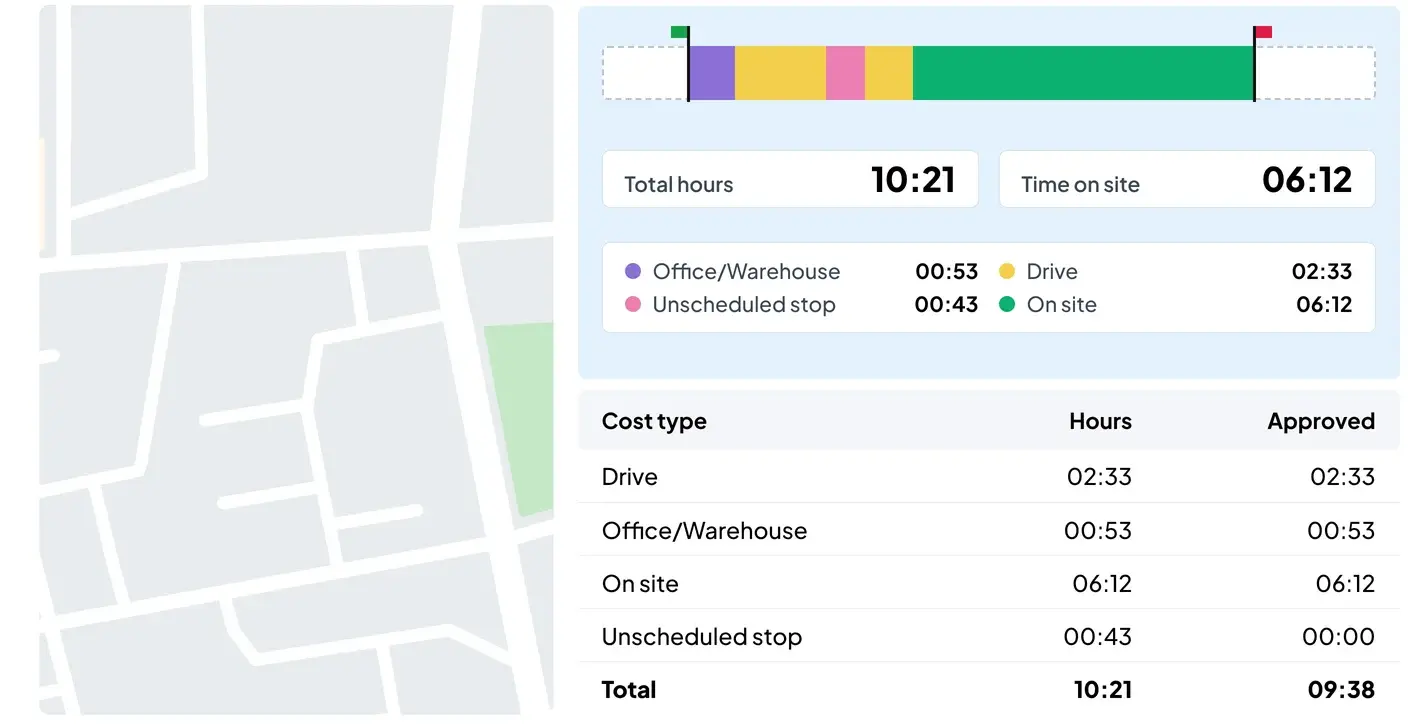
Capture drive time, time on site, and unscheduled stops
Eliminate manual entry and timecard errors
No cell service? Hours are stored and synced later
9:41
Time clock
Ready to start?
Clock in to begin your workday.
Clock InClocked in · 7:02 AM
Cost type: On site
Site: Job #4127 · Tower site
Duration: 06:12
Sent to payroll
Clock in to start the day
Live employee tracking & travel history
Geofence switches the code, time lands by activity
Timecards built and exported to payroll
On site · Job #4127
Driving · to Job #4130
On site · Job #3982
On site · Job #4127
Driving · ETA 9 min
Office / Warehouse
Unscheduled stop · Home Depot
Home DepotUnscheduled stop · 18 min
Marcus Watson
1420 Elm St, Gonzales, LA
Job #4127
Time on site · November
Target 75%
Marcus’s crew
82%✓
Albert’s crew
78%✓
Wade’s crew
69%−6
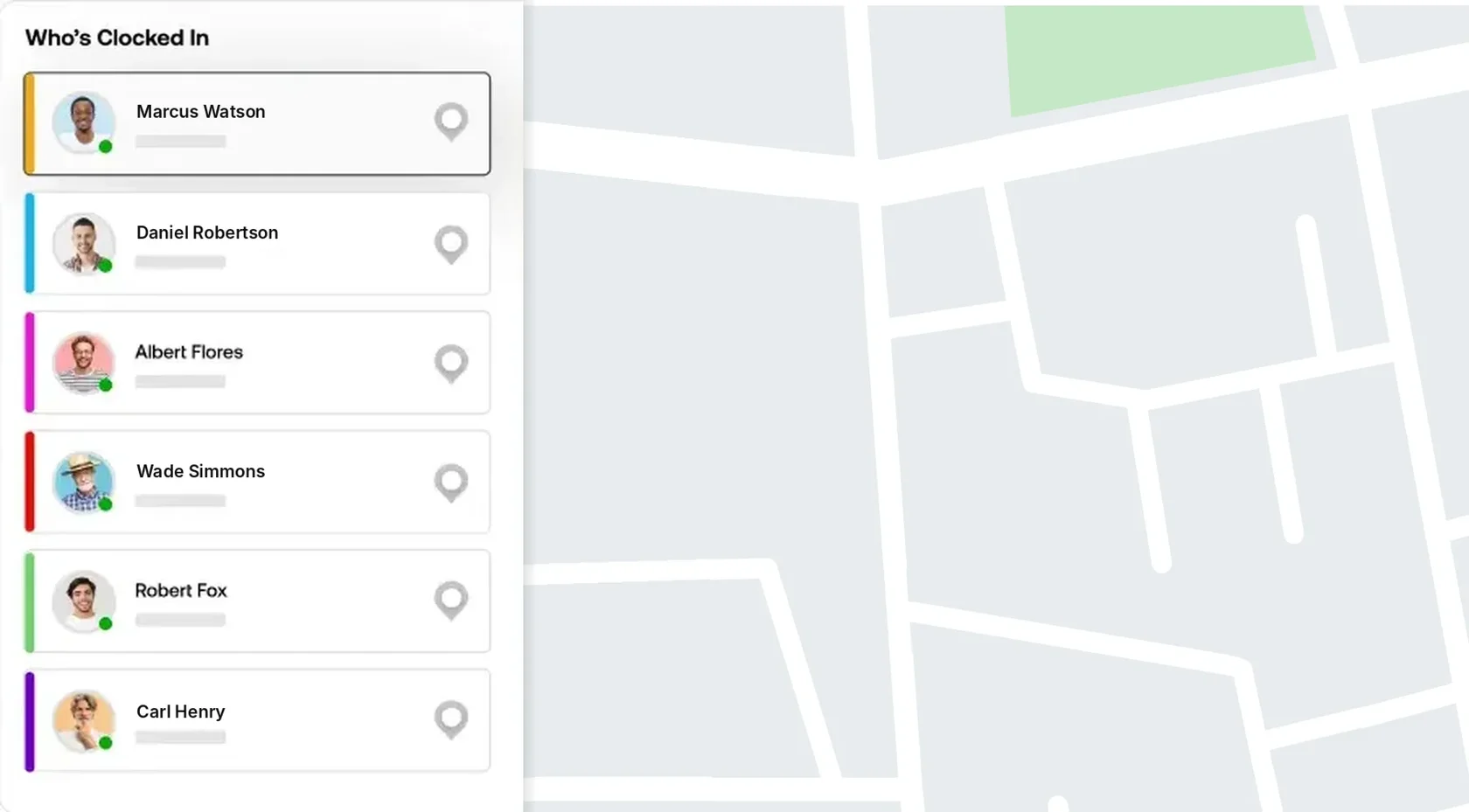
Know where every crew is working
Track unscheduled stops and non-productive time
Automated job reports every day
Set performance targets, see who hits them
Crew productivity
Less time wasted. More time on the job
Labor is your biggest cost. See where the hours go, every day. Fieldclix tracks time on site, drive time, and unscheduled stops, so you can cut leakage and put more hours on the job. Clients see 10–15% more time on site.
See which crews are on site right now
Set performance targets and see which crews hit them each month
Get automated job reports every day
Accurate job costs
Track your labor costs daily, job by job
Field hours land on the right job codes automatically, even when a crew works several sites in a day. Get automated job cost updates for active projects so you can stay on track to hit your budget.
Get early warning on overruns, before margins disappear
Invoice accurately for time-and-materials jobs
Bid the next job on real labor cost history
Track labor costs by job updated daily
Get early warnings on cost overruns
Loaded labor rates synced every payroll run
Protect your margins on every project
Pay rules applied automatically
Every request and change logged
Track compliance, manage risk
Works with any payroll system
Complex pay rules & compliance
Built for the pay rules that break other systems
Fieldclix applies pay rules by employee, location, and role, including prevailing wage, multi-rate pay, shift differentials, mileage, and overtime. Timecards arrive error-free. Run payroll quickly and with confidence.
Works with your payroll system of choice
Manage compliance risk, including California meal breaks and multi-state overtime
Every time change and approval logged for dispute protection
One connected workforce – better outcomes for every team
Owner / CEO
Know where every labor hour goes and protect your margins.
Operations Lead
See where every field hour goes, and put more of them on the job site.
Project Manager
Confirm crews are on site and catch jobs drifting over budget.
Payroll / HR
Timecards arrive approved, with your pay rules already applied.
Controller / CFO
Loaded labor costs by job, every day, before the job closes.
Field Employees
Just clock in and out. Schedules, job details, and directions in one app.
Learn how the COO of a field services company improved labor productivity and employee time on site.
30–40%of a mobile crew’s paid time can go to drives, shop and stops away from the job site
14,000hours a year away from the job site for a company with 20 field employees
2,100hours back from a 15% cut — the equivalent of one more field employee
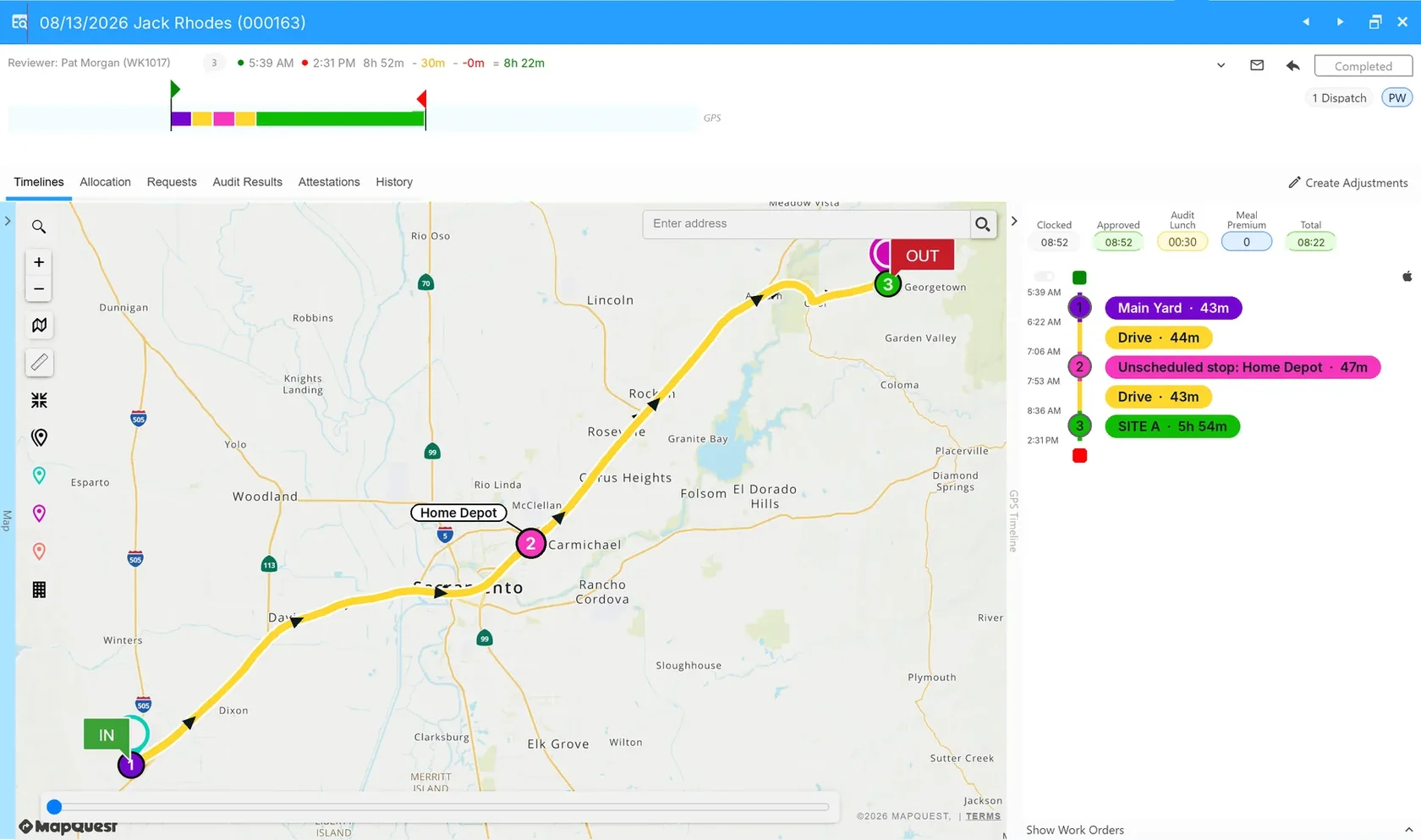
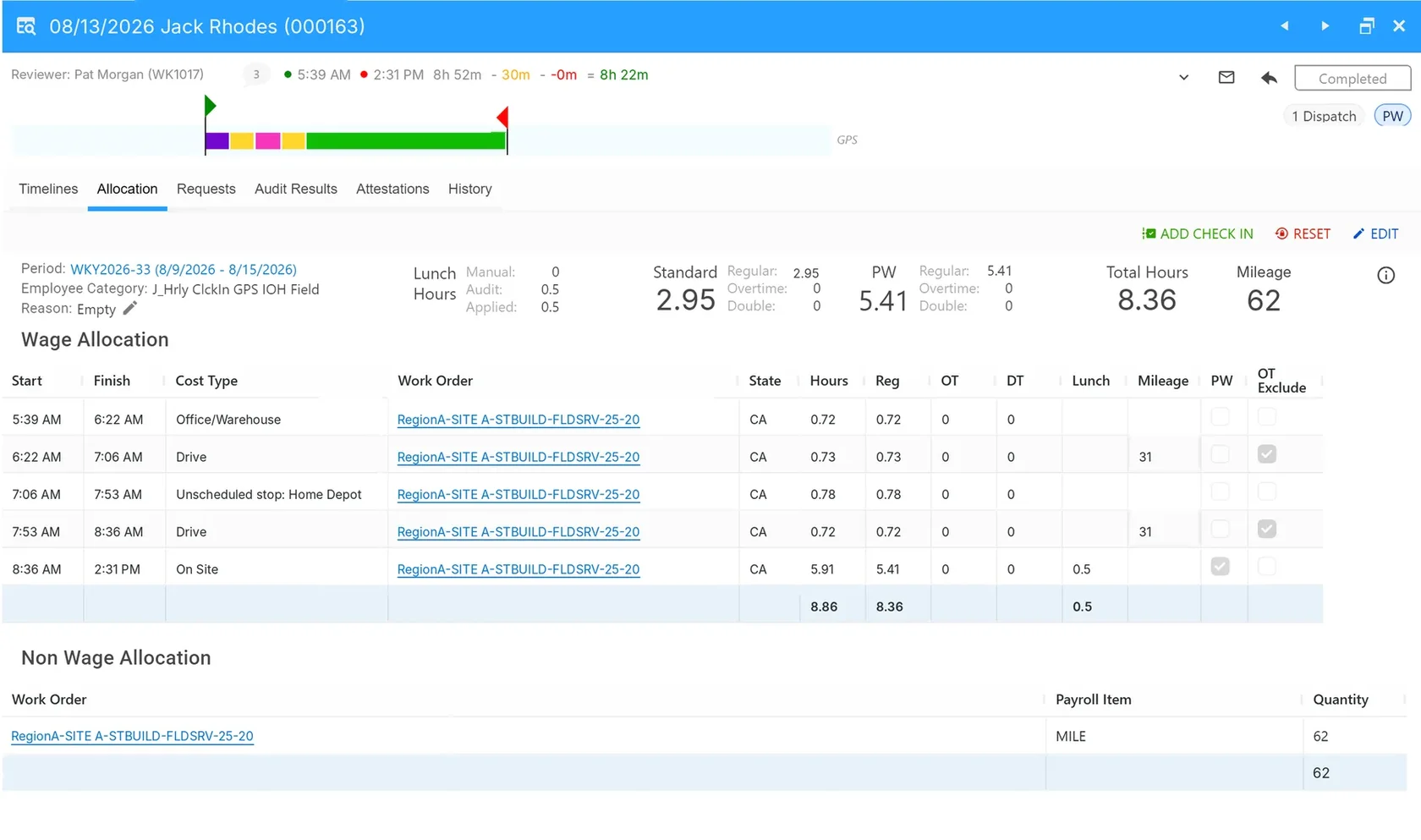
The whole day on one record. GPS clock-in and clock-out, every drive and stop, and total time, reviewed in one place.
Every minute allocated. Each segment gets a cost type, work order and state, split into regular, overtime, prevailing wage, and lunch hours.
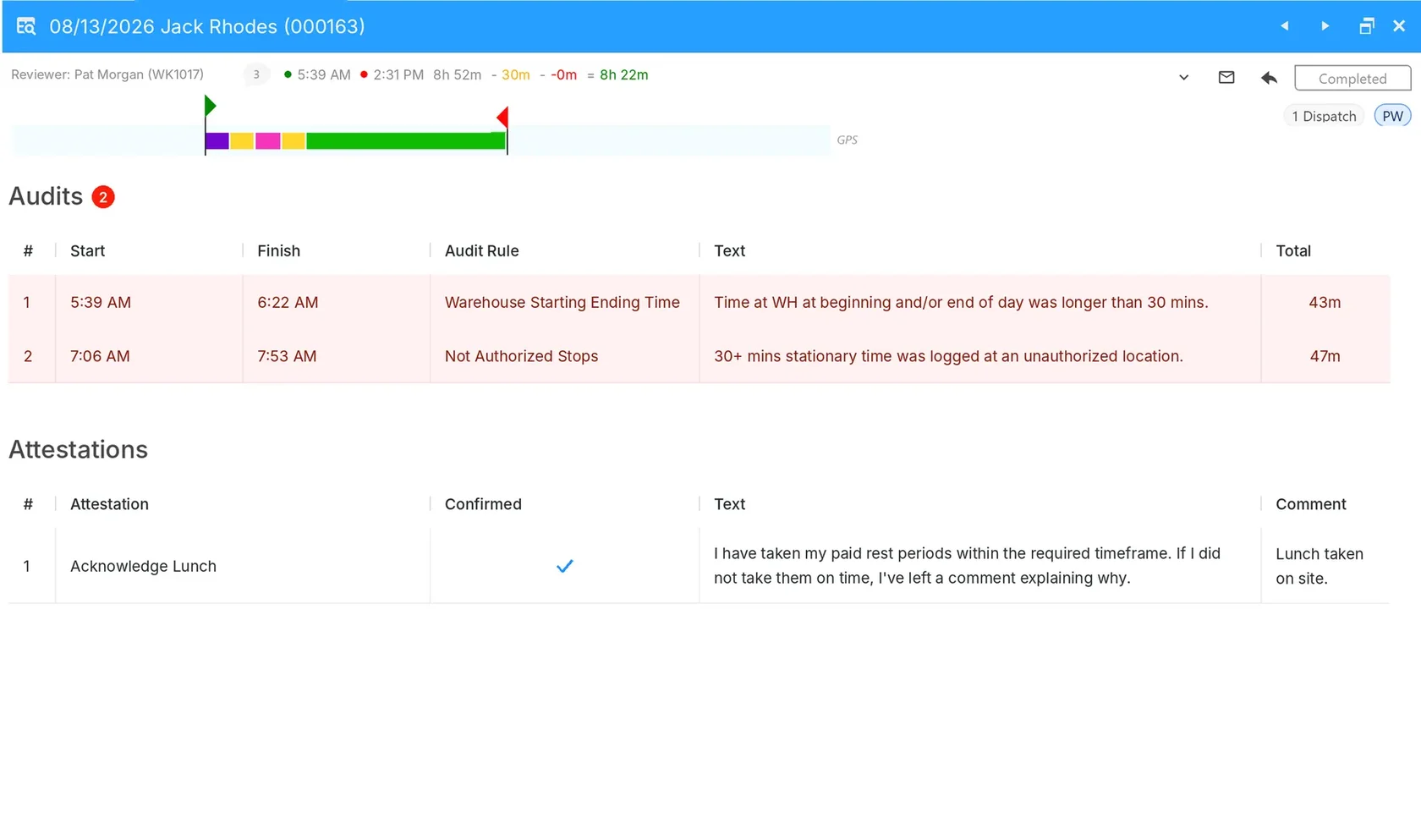
Audits and Attestations. Audit rules catch excess warehouse time and unauthorized stops. Employee attestations are recorded daily.
Customer stories
With Fieldclix, our project managers get daily updates that show where field hours are being spent so they can work with remote teams to increase productive time on-site.
Kent SmithCOO, Wireless Services
Because it’s GPS-driven, the guys just clock in once in the morning, and we capture everything we need, no excuses.
Gary OvsiowitzPartner, Diamond Landscaping
The system has significantly improved our ability to manage the complexities of prevailing wage projects… Fieldclix allows our team to confidently manage compliance obligations.
With Fieldclix, I get real-time visibility into site progress for more than a hundred remote projects across the country.
Matt HushGeneral Manager, AscendTek
We were about to sign with Procore when we came across Fieldclix. After a one-hour demo, we recognized that Fieldclix aligned more closely with our needs.
Jon CromptonPresident and CEO, J. Crompton Electric
Free field test
Try before you buy
1Pick your crewsInstall the Fieldclix app and you’re good to go.
2They clock in and outFieldclix automatically captures all drive, stop and site time.
3Review your real timecardsYour own pay rules, sites, and job codes — then decide.
Try before you buy. Install the Fieldclix app on your crew’s phones and review your own automated timecards.
How is Fieldclix different from other time tracking or project management tools?
Unlike many other time capture platforms, Fieldclix uses GPS and geofences to automatically allocate your field employees’ time to activities: shop, drive, job site and unscheduled stops. This lets us create payroll-ready timecards adjusted for your HR rules, including overtime, multi-rate pay, meal premiums and mileage-based per diem.
Fieldclix also helps minimize labor leakage by showing all non-productive time spent away from the job site.
And because hours are allocated to the correct job code, you can track hours against budget on every active project and see whether you’re on track.
In summary, Fieldclix can help streamline payroll, find ways to increase productive time at the job site, and help protect your valuable profit margins. See how Fieldclix compares.
What benefits can we expect to see?
Increase time at the job site by 10 to 15%. Track all your drive time, shop and warehouse time, supplier runs and unplanned stops to help find ways to reduce time spent away from the job site and get more work done, every day.
Timecards that build themselves. Hours land on the right job and activity, so no one chases crews for hours or job codes, and approval takes minutes instead of hours.
Job costs you can act on. Labor cost updates daily, with an early warning when a job is drifting over budget — while there’s still time to do something about it.
Payroll without the cleanup. Pay rules are applied before timecards reach payroll, every change and approval is logged, and meal breaks and attestations are on record if compliance is ever questioned.
Bid jobs more accurately. Labor history by job type and location helps create estimates for the next one.
Can Fieldclix automate complex pay rules and regulations?
Yes. Fieldclix applies the correct pay rules for each hour worked, so timecards arrive complete and payroll-ready. This includes daily, weekly and consecutive-day overtime (like California’s 7th-day rule), double time, multi-rate pay by activity, meal premiums and per diem, either a flat daily amount or mileage-based. Per diem goes to payroll as its own pay code where your payroll system supports one. When crews work in more than one state in the same day, each hour follows that state’s rules.
Prevailing wage is applied by job, jurisdiction, worker classification and rate, including apprentice and fringe rates. When an apprentice moves up a level, the new rate starts on its effective date, even mid-pay period.
Time outside your HR policy, such as an early clock-in while driving to work or time after leaving the last authorized location, is either removed automatically or flagged for a reviewer, depending on the rule. Every change is logged, including what changed and who changed it.
Does Fieldclix help control job costs?
Fieldclix allocates labor to the correct job code automatically, even when a crew works several sites in a day. Set a labor budget for each active project and the labor dials update daily with hours used, cost accrued and hours remaining. You see overruns forming while there is still time to adjust staffing.
Can Fieldclix handle California meal breaks?
Pop-up reminders tell crews when to start and end lunch. Late, short or missed lunches are flagged, and the meal premium is calculated automatically. At clock-out, crews attest they took lunch correctly, with an audit trail.
Does Fieldclix work with my payroll system?
Yes. Fieldclix plays well with others and can provide clean, accurate, payroll-ready timecards to any payroll system. Each system does what it does best, with no double entry.
Do we still need our payroll system’s time module?
No. Fieldclix captures the hours, applies your pay rules, and hands your payroll system an approved, payroll-ready timecard. Payroll does what it does best; Fieldclix does the part it was never built for: knowing where the hours actually went.
Can we try before we buy?
Yes. Fieldclix offers a free Field Test so you can capture and review your own timecards and make sure we’re a good fit. Request a demo below to get started.
How much does Fieldclix cost?
A monthly subscription based on your team size and features. No hidden fees: unlimited hosting and support are included.
Where do your field hours go?
Request a demo to see how companies like yours get automated timecards, accurate labor costs and more crew time on site.
Capterra
SoftwareConnect
“Their attention to detail, responsiveness, and commitment to customer service have truly set them apart.”